

What makes a control panel truly useful? The answer depends on your needs, but one thing is clear: a good panel should let you manage everything directly from the platform—quickly and without deep technical expertise. Below we describe how ispmanager delivers on that promise with practical, user-focused features.
1. Edit, Upload and Download Files Directly from the Panel
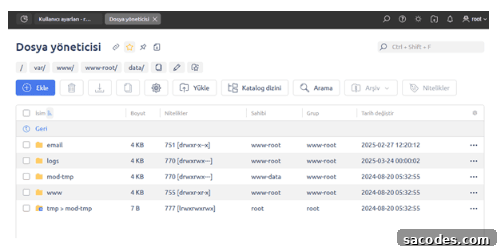
With ispmanager, there is no need for separate FTP clients or constant SSH sessions to manage files. File operations are available to users from within the panel and behave like a familiar file explorer. Key conveniences include:
- Drag-and-drop upload for fast transfers;
- Batch file operations, built-in archive management and syntax highlighting for effortless editing;
- Favorites for quick access to frequently used files.
2. Run PHP and Python on the Same Server
ispmanager supports multiple programming environments, including PHP and Python, allowing you to run different projects on the same server concurrently. This flexibility is especially useful when hosting multiple sites that require different versions or runtimes.
If some sites require older PHP versions while others need the latest release, you do not have to reconfigure the operating system manually. Assign the appropriate PHP version to each site through the panel.
Supported PHP modes include CGI, Apache module, FastCGI (Apache prefork), FastCGI (NGINX + PHP-FPM) and LSAPI. ispmanager also enables using Node.js across the server, which can benefit high-load projects and real-time applications.
3. BIND and PowerDNS Support
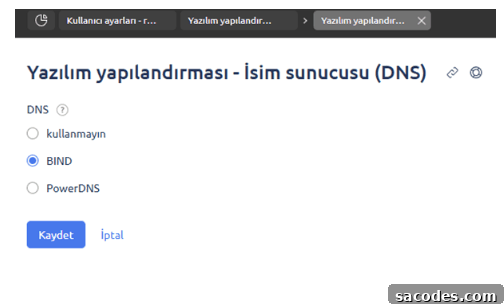
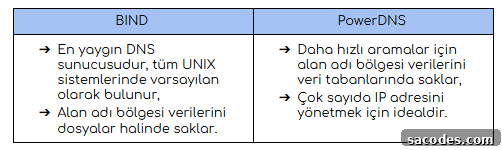
DNS settings can be managed directly from the panel or you can connect to an external DNS server. You can map domain names to IP addresses, configure DNS records and choose between two DNS server types: BIND and PowerDNS. The panel also supports DNSSEC, which adds a secure digital signature to DNS records. DNSSEC helps protect users from being redirected to fraudulent sites by ensuring DNS responses are authenticated and verified.
4. SSL, Firewall, BitNinja and Secure Email Protection
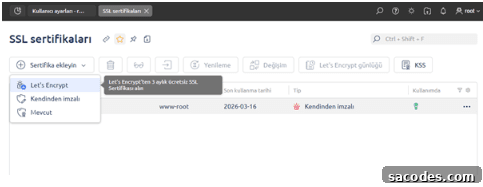
Security tools often require complex setups, but ispmanager integrates essential protections through an easy-to-use interface. Highlights include:
- One-click SSL certificate installation;
- An intuitive firewall configuration interface;
- Seamless integration with security services such as BitNinja for DDoS and malware protection.
Email protection features are comprehensive and designed to keep mail systems reliable and secure:
- DNSBL checks outbound and inbound mail against IP and domain blacklists;
- SpamAssassin filters unwanted messages based on headers and content;
- Greylisting rejects mail from untrusted servers until legitimacy is confirmed;
- ClamAV (referred to here as SlamAV) scans attachments and blocks infected files;
- DKIM support to improve mail server reputation and authenticity.
5. Full and Incremental Backups with Six Storage Options
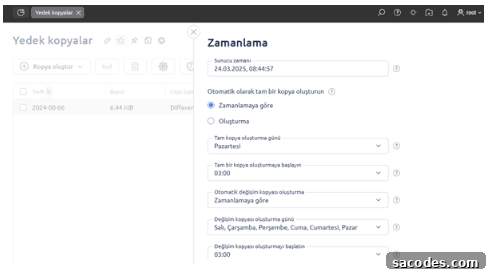
ispmanager supports both full and incremental backups. Full backups capture all user data at a point in time, while incremental backups store changes made since the last full backup. Backups can be stored on the same server or on a variety of external storage types:
- FTP storage;
- S3-compatible storage;
- SFTP (SSH) storage;
- Amazon S3;
- Dropbox;
- Google Drive;
- External or separately mounted hard drives.
There is also an option to configure backup encryption based on the OpenSSL library to secure stored backups.
6. Simplified Website and Database Management
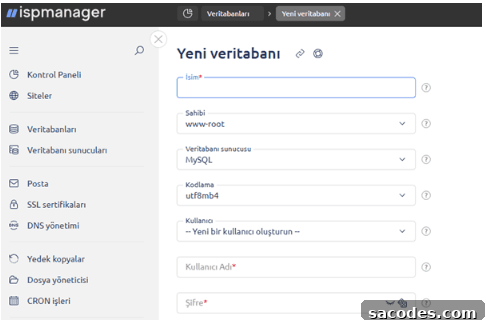
ispmanager’s tools reduce the time and technical expertise required to create and manage websites. Key website features include a free site builder and one-click CMS installs.
Free Site Builder
The included Site.Pro module lets you build everything from a simple landing page to a full online store. You can publish sites on your own server or host them on Site.Pro’s cloud if you prefer.
One-Click CMS Installation
If you prefer a content management system, ispmanager enables one-click installation of popular CMS platforms. Common options available include WordPress, Drupal, Joomla, Bitrix and HostCMS. There is no enforced limit on the number of sites you can create and manage through ispmanager.
Powerful Database Tools
Database administration is streamlined: ispmanager supports various DBMS platforms including MySQL, MariaDB, Percona Server and PostgreSQL. Routine tasks no longer require external tools like PhpMyAdmin or PhpPgAdmin, because ispmanager provides built-in capabilities to:
- Create and remove databases;
- Manage database users and passwords;
- Configure remote access;
- Import, export, back up and restore databases directly from the panel.
You can also run multiple DBMS versions on the same server using Docker containers. ispmanager allows fine-grained access control for database users, restricts remote access by IP and limits specific operations if needed. Maintenance tools such as mysqlcheck for table optimization and mysqlrepair for table fixes are available to keep databases running smoothly.
Further resources and support
Documentation: ispmanager configuration documentation
Change log: planned updates and release notes
Knowledge base: troubleshooting articles and guides
Support: [email protected]