

Dedicated Server refers to a hosting solution where an entire physical server is allocated to a single website, application, or organization instead of sharing resources with other users. This arrangement is common in internet technologies and web hosting and is especially suitable for high-traffic websites, large e-commerce platforms, and applications that require intensive data processing or strict security controls.
Dedicated Server Features
Performance: Dedicated servers provide high processing power, large memory capacity, and dedicated storage. Unlike shared hosting, all resources belong to a single tenant, which ensures consistent, fast performance even during traffic spikes.
Security: Because resources and access are isolated, dedicated servers offer stronger security than shared environments. This reduces exposure to threats originating from neighboring accounts and makes it easier to implement custom security measures.
Customizability: Users can tailor a dedicated server to their exact needs. Operating system choice, installed software, and detailed configuration settings are fully under the customer’s control, allowing optimized setups for specific workloads.
IP Address: Dedicated servers typically include one or more dedicated IP addresses. This can improve email deliverability and has potential SEO and reputation benefits for services that require stable IP assignments.
Where Dedicated Servers Are Used
- E-commerce Sites: Online stores that handle high traffic and sensitive payment transactions often require the performance and security guarantees of a dedicated server.
- Game Servers: Online multiplayer games and game hosting need low latency and high CPU performance, making dedicated hardware a common choice.
- Database Management: Applications that rely on large, transactional databases benefit from dedicated resources for fast, reliable access and consistent I/O performance.
- Streaming Services: Video and audio streaming, as well as other bandwidth-intensive services, require high throughput and stable network connections available from dedicated servers.
Choosing a Dedicated Server: Key Considerations
Hardware Specifications: CPU capabilities, RAM size, and storage type directly determine server performance. Select components based on expected compute and I/O demands.
Bandwidth and Network: Choose bandwidth and network capacity that match your traffic patterns. Sufficient throughput and low latency are essential for user experience, particularly for streaming or real-time services.
Support and Reliability: The quality of technical support and the provider’s infrastructure reliability are critical when issues arise. Evaluate support SLAs and redundancy options before committing.
Cost: Dedicated hosting is more expensive than shared hosting, but the added performance, security, and control often justify the cost. Consider total cost of ownership, including management, backups, and potential scaling.
Physical server rental can be a viable option when long-term, predictable performance and full hardware control are required.
Conclusion
Dedicated servers deliver high performance, enhanced security, and deep customization for websites and applications with demanding requirements. When selecting a dedicated server, carefully evaluate hardware, bandwidth, support, and cost to match your workload. The right choice can strengthen your online presence and improve the experience for your users.
Ideal Hardware Configurations for Dedicated Servers
Dedicated servers should be configured according to the intended workload and expected traffic. Server performance and efficiency depend on carefully chosen hardware components tailored to your application’s needs.
Main Components and Their Importance
- Processor (CPU): The CPU is the core of server compute power. Multi-core processors with high clock speeds are best for compute-heavy tasks. Enterprise-grade CPUs like Intel Xeon or comparable AMD families are typical choices for demanding environments.
- Memory (RAM): RAM stores active data for quick access. Higher RAM capacity improves database operations and concurrent request handling. Modern web applications often benefit from 32 GB or more, depending on scale.
- Storage (SSD/HDD): Persistent data lives on storage devices. SSDs provide much faster read/write speeds than HDDs and improve overall responsiveness. RAID configurations enhance data availability and fault tolerance.
- Network and Bandwidth: The server’s internet connection speed and bandwidth capacity directly impact user experience. High bandwidth and low-latency networking are critical for streaming, file transfers, and interactive services.
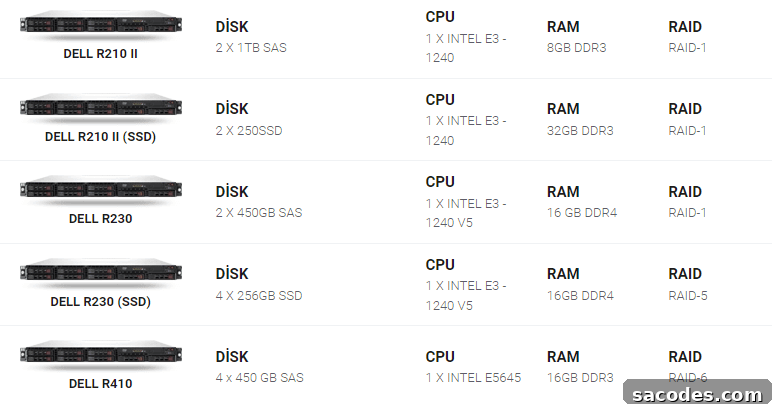
Configuration Examples by Application Type
- Web Hosting and E-commerce: Multi-core CPUs (for example, mid to high-end Xeon series), 16–32 GB RAM or higher, and SSD-based storage. RAID 1 or RAID 5 is commonly used to protect data redundancy.
- Game Servers: High-frequency CPUs that excel at single-threaded tasks, 32–64 GB RAM, and fast SSD storage. Optimized networking for low latency is important for player experience.
- Database Servers: CPUs with many cores and strong multi-thread performance, 64 GB RAM or more, and SSDs with high IOPS. RAID 10 configurations balance performance and redundancy for critical databases.
Optimal dedicated server configurations vary according to budget and workload. Prioritize CPU, memory, storage type, and network capacity based on application requirements and projected user load. For many organizations, long-term physical server rental combined with an appropriate hardware selection yields the best balance of performance, security, and cost-efficiency.
Best Speed Test Tools for Dedicated Servers
Measuring a dedicated server’s performance regularly helps maintain efficiency and detect problems early. Speed tests evaluate response time, bandwidth, and data throughput, revealing network issues, hardware limits, or configuration bottlenecks.
Why Run Speed Tests?
Speed testing reveals server response times, bandwidth availability, and data processing throughput. These tests help identify network constraints, hardware bottlenecks, or misconfigurations that could degrade user experience.
Popular Speed Test Tools and Their Strengths
- Speedtest by Ookla: Widely used for basic internet speed checks, measuring download and upload speeds and ping times with a simple interface.
- Pingdom Tools: Provides comprehensive site performance analysis, including page load times, server response times, and content optimization suggestions.
- GTmetrix: Analyzes page load performance and highlights slow elements with actionable recommendations to improve speed.
- Load Impact: Tests how a server behaves under simulated traffic and concurrent users to assess scalability and resilience under load.
- WebPageTest: Runs tests from multiple locations and provides detailed reports on performance bottlenecks and timing breakdowns.
- iPerf3: A command-line tool for measuring raw network throughput over TCP and UDP, useful for detailed bandwidth diagnostics.
Tips for Accurate Speed Testing
- Run tests at different times and under varying network conditions to obtain a comprehensive view of performance.
- Compare results from multiple tools to reduce bias and validate findings.
- Consider server and test location proximity, since geographic distance affects latency and throughput; choose test servers near your deployment region for realistic results.
Conclusion
Regular performance testing of dedicated servers is essential to ensure optimal operation and to spot issues early. Combining multiple testing tools provides the most complete assessment. With appropriate monitoring and well-chosen hardware, dedicated servers can deliver reliable, high-performance hosting for demanding applications.