

Setting up an API server on Linux hosting is a key step for modern web applications and services. This guide walks you through how to install, configure, secure, and run an API server on a Linux hosting environment. It is written with SEO best practices in mind and highlights important keywords such as Linux hosting, API server, and API framework to help you find the information you need quickly.
1. Introduction
API (Application Programming Interface) enables software systems to exchange data and functionality. An API server is the web service that exposes those endpoints. Linux hosting is often the preferred platform for API servers because of its stability, performance, and extensive tooling. In this guide we cover the entire process of API server setup on Linux hosting, from initial preparation to deployment and maintenance.
2. Requirements
Before you begin your API server installation, make sure you have these essentials in place:
- A Linux hosting account or server
- SSH access to that server
- Familiarity with basic Linux commands
- An API framework choice (for example Flask, Django, or Express.js)
Having SSH access and a selected framework will allow you to install dependencies and run your API reliably on the server.
3. Server Preparation
a. Connect to the Server via SSH — Use SSH to connect to your Linux hosting instance so you can perform administrative tasks and deploy your application. The image below illustrates a typical SSH connection step.

b. Update the Server — Once connected, update system packages and security patches. Keeping your server up-to-date reduces vulnerabilities and ensures compatibility with the latest libraries and runtimes.

4. Install Required Software
a. Install Python and pip — If you choose a Python-based API framework, install the appropriate Python version and pip package manager to handle dependencies and virtual environments.

b. Install Node.js and npm — For Node.js-based frameworks like Express.js, install Node.js and npm to manage packages and run your application runtime.

5. Install the API Framework
a. Flask API Setup — If you opt for Flask, install it via pip and create a simple application as a starting point. The example image shows package installation and a minimal Flask app structure.

A basic Flask application file is shown below in the example image; save it (for example as app.py) and run it to verify your endpoints respond correctly.
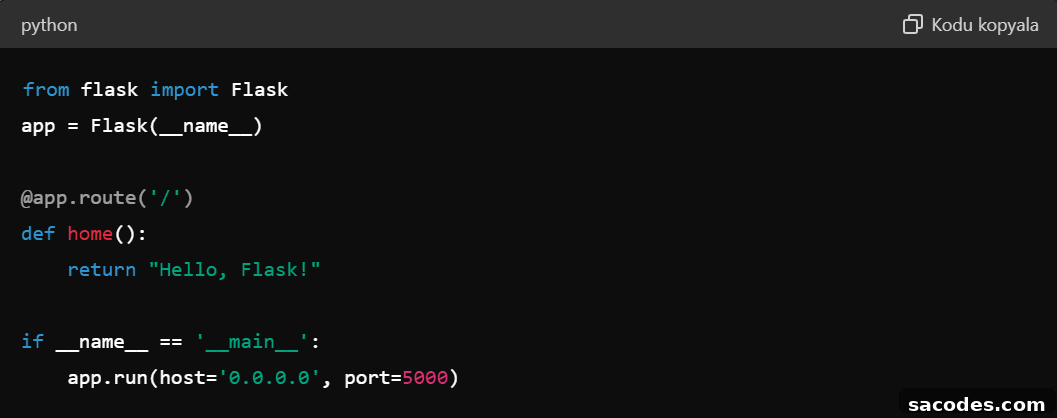

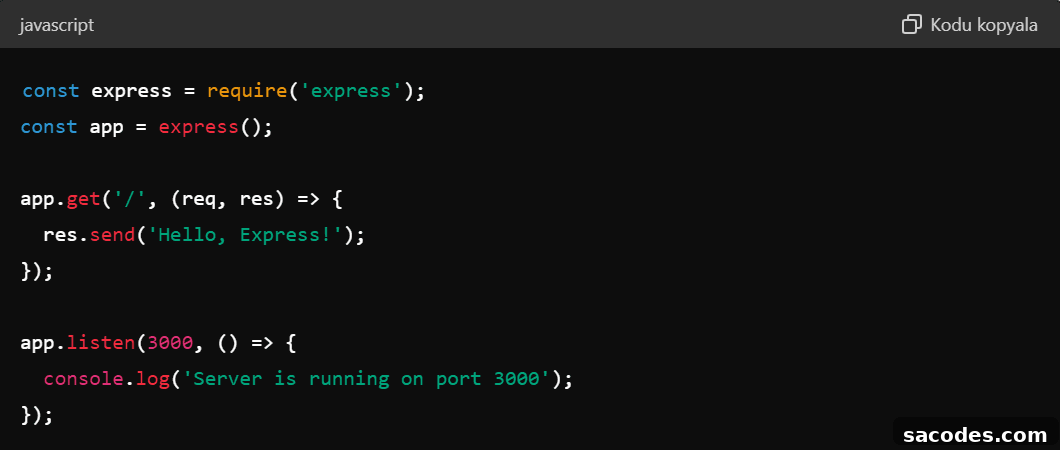
b. Express.js API Setup — For a Node.js approach, the example demonstrates initializing a project with npm and creating a minimal Express.js server. Save the file (e.g., app.js) and start the service to confirm behavior.


6. Security Measures
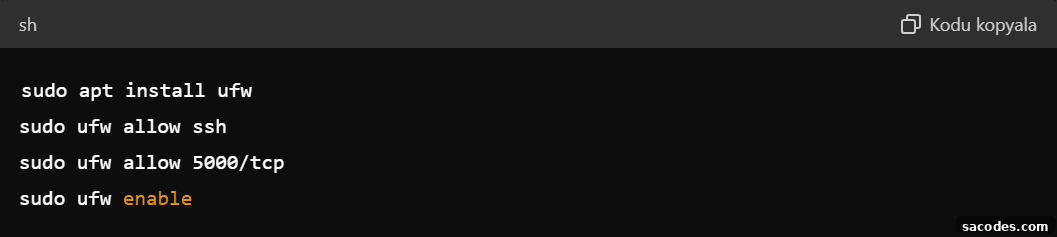
a. Configure a Firewall — Protect your server from unauthorized access by configuring a firewall such as UFW. Allow only necessary ports (for example SSH and your API port) and restrict everything else.
b. Install an SSL Certificate — Use an SSL certificate to secure traffic between clients and your API server. Free services like Let’s Encrypt can provide trusted certificates to enable HTTPS for your endpoints.

7. Run the API Server as a Service
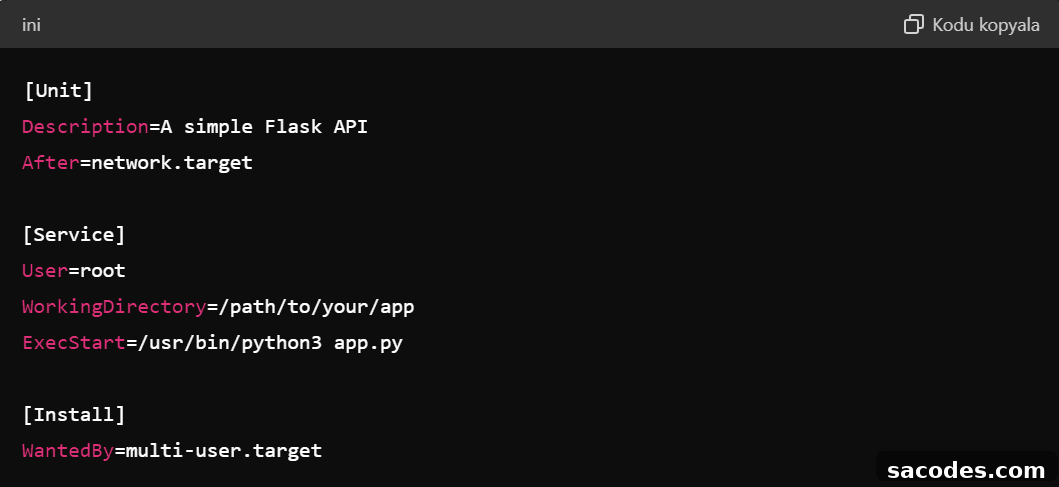
To ensure high availability, run your API server as a background service. Using systemd on Linux, you can create a service unit that starts your Flask or Node.js app at boot and restarts it on failure. The example images illustrate how to create and enable a systemd service unit file and start the service.

Populate the unit file with the necessary service settings as shown in the example and then enable and start the service so your API runs continuously.

8. Conclusion
Deploying an API server on Linux hosting is straightforward when you follow the right steps: prepare the server, install required runtimes and your chosen API framework, secure the environment with firewall and SSL, and run the application as a managed service. This approach gives you a secure, scalable, and maintainable foundation to serve APIs for web, mobile, and integration projects. With these practices, you can confidently deploy and operate a production-ready API server on Linux hosting.