

.htaccess is a configuration file used on Apache web servers to control server behavior for a specific directory and its subdirectories. Placed in a site’s root or any subdirectory, an .htaccess file lets administrators and developers manage redirects, access rules, MIME types, compression, and many other server-level settings without modifying the main server configuration.
Most Common .htaccess Rules
Below are some of the most frequently used .htaccess directives and their typical purposes. These examples show what .htaccess is commonly used for and how it helps improve security, usability, and SEO.
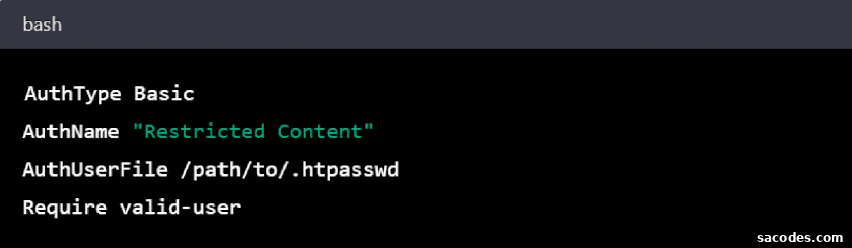
- Access control: Restrict or allow access to files or directories based on IP addresses, require authentication for specific areas, or deny access to sensitive files. This helps protect admin areas, private downloads, or configuration files from unauthorized users.
- Redirects: Redirect visitors from old URLs to new pages or domains. Proper redirects preserve SEO value and ensure users land on the intended content after structural changes or site migrations.
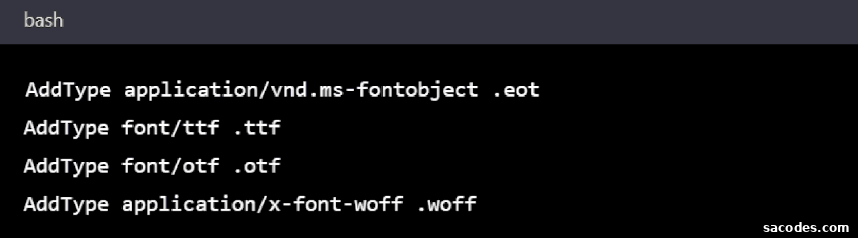
- MIME types: Define or override MIME types for specific file extensions so browsers handle resources correctly. This ensures files such as fonts, scripts, and downloadable assets render or download as intended.
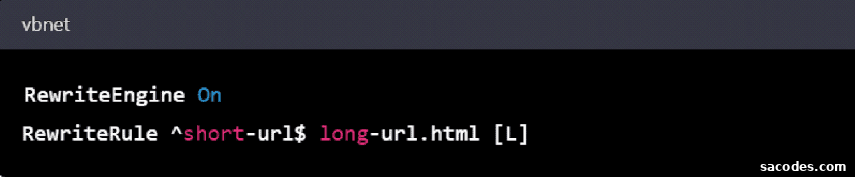
- URL rewriting (short URLs): Transform long, query-based URLs into clean, search-engine-friendly paths using RewriteRule and RewriteCond. Cleaner URLs improve readability and can boost SEO.
- Error pages: Serve custom error pages (for example, 404 or 500) to provide a better user experience and keep branding consistent when errors occur.
- Compression: Enable gzip or Brotli compression for text-based assets like HTML, CSS, and JavaScript to reduce payload sizes and speed up page loads.
Example code image:
- Redirect example: Use redirects to send traffic from outdated pages to new locations and ensure search engines index the correct URLs.
Example redirect image:

- Defining MIME types: Explicit MIME declarations avoid incorrect content rendering and help browsers treat files consistently.
MIME example image:
- URL shortening / rewriting: Rewrite rules make URLs easier to read and improve user experience.
Rewrite example image:
- Custom error pages: Return branded error pages that help retain visitors and explain next steps when content is missing or a server error occurs.
Error page example image:

How .htaccess Works
The .htaccess (Hypertext Access) file contains a set of directives the Apache web server applies to the directory where the file resides and to all its subdirectories. Apache reads .htaccess files on each request (unless configured otherwise), so changes take effect immediately without restarting the server. Common directives use modules such as mod_rewrite, mod_headers, and mod_expires to implement rewriting, header manipulation, compression, and caching rules.
Because .htaccess rules are applied at the directory level, you can create different behaviors for separate sections of a site. For example, you might block access to a private folder, enable gzip compression for all HTML files, or redirect outdated resources to new locations. The file is a plain text file and is typically edited with a text editor, FTP client, or the hosting control panel’s file manager.
Editing .htaccess requires care: a small syntax error can cause server errors or make portions of the site inaccessible. For security, only trusted users with appropriate server access should modify .htaccess files. When possible, test changes in a staging environment before applying them to production.
Common Uses for the .htaccess File
The .htaccess file is versatile and used for many tasks that improve site performance, security, and SEO. Typical use cases include:
- Redirects and canonicalization: Manage 301 and 302 redirects, force trailing slashes, or standardize the canonical domain (www vs non-www, HTTP to HTTPS), which helps search engines and avoids duplicate content issues.
- Authentication and access control: Create password-protected directories, restrict access by IP address, or block malicious bots and crawlers.
- Cache control: Set cache headers for static assets to improve page load speed and reduce server load.
- Compression and performance: Enable gzip or Brotli to reduce response sizes and accelerate page delivery to users.
- Error handling: Serve custom error pages to improve user experience and guide visitors when content is missing or an error occurs.
- MIME configuration and file handling: Ensure files are delivered with the correct content type so browsers and clients handle them correctly.
- Script handling: Direct which scripts or interpreters process specific file types when needed by your application.
- SSL and HTTPS enforcement: Redirect HTTP requests to HTTPS and help ensure secure connections for users.
These examples illustrate the practical benefits of using .htaccess to manage site behavior at the directory level. Because mistakes in .htaccess can impact availability or security, recommend working with a knowledgeable developer or testing thoroughly before deploying changes on a production server.