
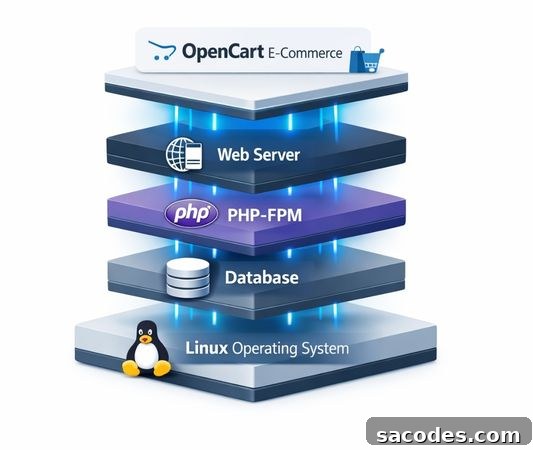
Linux Hosting running OpenCart is a manageable and technically flexible option for small and medium-sized e-commerce projects. Because OpenCart is PHP-based, it integrates naturally with web servers and databases in the Linux ecosystem. However, a simple “install and run” approach often falls short; the real difference comes from choosing the right PHP version, setting correct file permissions, enabling effective caching, tuning database settings, and applying security layers.
In this article I cover the most impactful technical decisions, common mistakes, and a production-ready setup approach for using OpenCart on Linux Hosting. I’ll connect the system administrator’s perspective with the tangible effects an e-commerce manager will observe.
Compatibility of Linux Hosting and OpenCart: What to See as Advantage and What as Risk
Linux Hosting spans a wide range from shared hosting to VPS. The critical issue for OpenCart is the level of control your hosting provides. Shared plans let you launch quickly but may impose PHP process limits, file I/O restrictions, and database resource caps that can bite during growth. VPS or cloud servers give more control but increase maintenance responsibility.
A key technical point is OpenCart’s operational model. Although catalog pages may appear relatively static, filtering, search, cart, and checkout processes are database-driven. On Linux Hosting, bottlenecks are often felt as disk and database latency rather than raw CPU. Therefore, evaluate not only CPU cores but also database response times and storage performance.
The extension ecosystem is another important factor. OpenCart stores typically expand with modules; as module count rises, so do query volume, memory usage, and cache needs. This transforms an OpenCart on Linux Hosting installation from a one-time setup into a living system that requires ongoing optimization.
Server Stack: Reading Apache/Nginx, PHP-FPM and the Database Layer Correctly
OpenCart typically runs on LAMP (Linux + Apache + MySQL/MariaDB + PHP) or LEMP (Linux + Nginx + MySQL/MariaDB + PHP). Which stack is preferable depends on traffic patterns and application behavior. Apache offers .htaccess flexibility and quick adjustments; Nginx is often more efficient for serving static content and handling many concurrent connections. The realistic question is not “which is better” but “which configuration is correct for your workload.”
On the PHP side, how PHP is executed matters. Using PHP-FPM with process pools is more predictable for resource management than older CGI-like methods. Properly tuned pools prevent the site from appearing frozen during campaign peaks when many cart and checkout requests arrive simultaneously.
In the database layer, indexes are frequently overlooked. Product searches, category filters, and option variations in OpenCart generate heavy query loads. If tables have grown and indexes are insufficient, the most expensive resource becomes wait time, not CPU. Measure database response times to get the real performance picture regardless of hosting type.
PHP Configuration for OpenCart: Version, Extensions and Limits
OpenCart must be compatible with the PHP version you run—not just to avoid errors but for performance. Newer PHP releases typically include optimizations and improved memory handling; however, older extensions may be incompatible. Update strategy should involve testing the core and modules together, not the core alone.
Memory limits, upload sizes, and max execution times directly affect store operations. Product imports, image uploads, and backups can fail with low limits, and those failures are often mistaken for application bugs when the real issue is hosting limits. Rather than arbitrarily raising limits, review logs to identify which tasks hit thresholds.
Opcode caching is another inexpensive yet effective optimization. Enabling an opcode cache prevents repeated recompilation of the same PHP files and reduces CPU usage—particularly noticeable during category and product browsing.
File Structure and Permissions: A Small Mistake Can Become a Big Security Hole
OpenCart on Linux Hosting requires careful file permission management. Writable folders should be limited to those that truly need write access. Otherwise, a file upload vulnerability or a weak admin password can allow an attacker to write to the filesystem. This risk is amplified in shared environments with weak tenant isolation.
Hygiene for the admin panel is essential. Renaming the default admin directory reduces noise from automated scans but is not a full protection. Strong passwords, two-factor authentication, and restricting admin access by IP or HTTP auth add meaningful security layers.
Logs are often treated as disk fillers and disabled. Yet logs are the system’s black box when a faulty module update, failed payment callbacks, or bot attacks occur. Set an appropriate log level and enable log rotation rather than turning logging off.
Performance Optimization: Caching, Image Strategy and Database Discipline
OpenCart performance gains largely come from avoiding regenerating identical content each time. Page caching, query caching, and object caching all help, but there’s no one-size-fits-all solution—catalog size, visitor profile, and module count vary by project.
Images are a distinct challenge. Large, unoptimized product images make a site feel slow regardless of server power. Image optimization means more than resizing: choose the right formats, set appropriate quality, and generate multiple resolutions for responsive delivery. This directly affects conversions, especially for mobile-heavy traffic.
Database hygiene equals performance. Unused module tables, bloated session records, and growing search logs slow queries. Regular maintenance keeps load predictable so Linux Hosting resources are used efficiently and your store remains stable during promotions.
Practical Checklist to Withstand Traffic Spikes
- OpenCart: disable and remove unnecessary modules—don’t leave them just inactive.
- Enable and verify the PHP opcode cache.
- Review slow query logs and resolve the most expensive queries first.
- Serve images in modern formats and appropriate sizes; apply a separate strategy for mobile.
- Limit bot traffic with rate limiting and basic security rules.
Security Layers: SSL, Update Strategy and Payment Flows
OpenCart e-commerce security is more than installing a certificate. SSL/TLS is mandatory, but the main risks are around the admin panel, modules, and payment integrations. Random updates can harm availability as much as they improve security. A correct approach is to test updates in a staging environment, deploy to production, and have a rollback plan.
Payment flows require special care. If callback endpoints, verification signatures, or return URLs are misconfigured, fake notifications may mark orders as paid. Secure design here involves server-level protections as well—additional validations, rate limits on endpoints, and logging suspicious requests reduce the attack surface.
Backups are part of security. Without a known good restore point after an incident or faulty update, you may face hours or days of downtime. Implement file and database backups together and rehearse restores regularly.
Deployment and Operations: Staging, Cron Jobs and Monitoring
OpenCart on Linux Hosting benefits most from a staging workflow: test changes in a similar environment before deploying to production. This prevents classic issues such as a blank page after a module update from affecting customers.
Cron jobs are often neglected in OpenCart ecosystems. Tasks like session cleanup, log rotation, campaign updates, and product synchronizations should run via cron to avoid running during user traffic and causing delays or data buildup.
Monitoring should go beyond “is the site up.” Regular checks of cart additions, progression to checkout, and admin panel response times are crucial because e-commerce problems often manifest as slowdowns rather than full outages, and those slowdowns translate directly into lost sales.
Robust Production Release Routine
- Test module and theme updates in staging before going live.
- Automate database and file backups and practice restore scenarios.
- Schedule maintenance tasks with cron rather than during peak traffic.
- Monitor cart and checkout flows with synthetic tests, not just the homepage.
Transparency and Source Policy
The technical guidance here is based on established engineering practices for web server architectures, PHP hosting, and OpenCart’s operational model. For verification, OpenCart’s official documentation, PHP configuration manuals, and Apache/Nginx guides are appropriate reference sources. Publishing an “About” or “Author” page that outlines the technical background of content creators increases reader trust.
My goal is not only to describe installation steps but to make visible the real bottlenecks businesses face as their Linux Hosting-hosted OpenCart e-commerce stores grow. If your store is scaling, there’s no single magic setting; consistent measurement, controlled updates, and disciplined maintenance will deliver sustainable performance.