
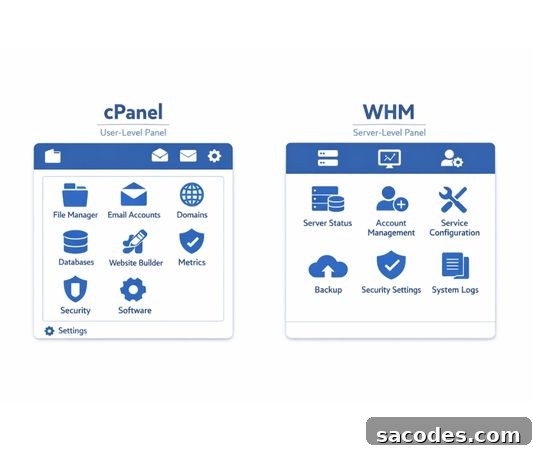
Web hosting infrastructures rely on control panels to deliver operational efficiency for both system administrators and end users. The two most commonly encountered names are cPanel and WHM. While many people assume these tools are the same, they serve distinctly different roles, permission levels, and use cases. This article examines the differences between cPanel and WHM in depth—covering technical details, practical scenarios, and infrastructure considerations rather than only surface-level definitions.
What Is cPanel and What Is It Used For?
cPanel is a graphical control panel designed for end users who purchase web hosting services. It enables website owners to manage their sites, email accounts, and domain settings through an intuitive interface. Built for users with limited technical knowledge, cPanel simplifies complex server tasks so site owners can perform daily operations without needing command-line access or deep server administration skills. In short, cPanel represents the “user-facing” layer of a hosting environment.
Many routine website tasks are handled inside cPanel: uploading files, creating databases, adding email addresses, and managing backups. Consolidating these functions into one interface reduces the need for FTP clients, manual configuration, or direct server access, making site management faster and less error-prone.
From a technical perspective, cPanel provides an isolated workspace for each hosting account. Users can only access resources allocated to their own account, which enhances security. Even when multiple accounts share a physical server, the cPanel architecture prevents cross-account data access, helping to contain risks and preserve privacy.
What Is WHM and What Needs Does It Serve?
WHM (WebHost Manager) is the higher-level control panel used to manage servers and hosting accounts. Typically utilized by hosting providers, resellers, and system administrators, WHM allows administrators to create, delete, and configure cPanel accounts. It provides centralized control for hosting businesses and technical teams.
WHM functions as the server’s central management hub: allocating CPU, RAM, and disk quotas; applying security policies at the server level; and restarting services when necessary. Because these operations affect the entire server, WHM is intended for users with higher technical expertise and administrative privileges.
A key distinction is that WHM does not directly manage website content. Its primary purpose is to manage the cPanel accounts that host and serve that content. This hierarchical model creates order and scalability for large hosting operations where many individual accounts exist on the same infrastructure.
Permission Levels: How cPanel and WHM Differ
The clearest difference between cPanel and WHM is permission level. cPanel users have restricted permissions and can only make changes within their own account. This restriction protects users from accidentally affecting other customers and preserves overall system stability.
WHM, by contrast, grants full or partial server-wide management capabilities. An administrator can create new accounts, modify resource limits, and suspend problematic accounts through WHM. For reseller hosting providers, this ability to control multiple accounts from one place is essential for efficient operations.
That separation of power also limits the impact of errors: a cPanel user’s mistake typically affects only that account, whereas a WHM-level mistake has the potential to affect the entire server. For this reason, WHM access is usually tightly controlled and reserved for trained personnel.
Technical Comparison by Use Case
cPanel is ideal for individual site owners, small businesses, and content creators. It provides all the tools needed to publish and maintain a website without requiring advanced technical skills. Users can manage files, databases, email, and security from one place.
WHM is indispensable for hosting providers who serve multiple customers. A single server can host hundreds of cPanel accounts, all centrally managed through WHM. This model reduces operating costs and improves administrative efficiency, especially at scale.
Technically, WHM acts as the decision-making layer at the server level, while cPanel is the execution layer that applies those decisions to individual accounts. Together, they form a clear and maintainable role separation within a hosting ecosystem.
Resource Management and Performance
Efficient resource allocation is vital for sustainable hosting performance. WHM governs how server resources—CPU, memory, and disk space—are distributed among accounts. These allocations are typically organized into packages or plans that define limits and priorities.
cPanel users operate within the resource limits set by WHM. They cannot exceed assigned quotas, which helps maintain performance balance across all accounts. Proper planning through WHM ensures that resource-hungry sites do not degrade the experience of other users on the same server.
On high-traffic servers, accurate resource planning in WHM improves stability and delivers more consistent performance for cPanel users. This makes WHM a crucial tool for maintaining performance SLAs and predictable hosting behavior.
Security Management Differences
Security requires a layered approach. WHM is the place to define server-wide security policies: firewall rules, open ports, and system updates are managed here. These global settings protect the server as a whole.
cPanel provides user-level security tools: installing an SSL certificate, changing passwords, and protecting directories. This combination of centralized and user-specific controls narrows the attack surface and limits the spread of potential breaches.
Even if a server-level vulnerability occurs, account isolation enforced by cPanel helps contain the impact, preventing widespread compromise across user accounts.
Backup and Recovery Processes
Backup strategy is critical to minimize data loss. WHM defines server-wide automatic backup policies—daily, weekly, or monthly—so administrators can schedule and manage full-server backups.
Meanwhile, cPanel users can create and restore backups for their individual accounts. This flexibility lets users maintain control over their data, while full server restores remain under WHM management. In large hosting environments, this separation enables faster recovery: administrators can restore entire systems from WHM, while users handle account-level restoration through cPanel.
Which One Should You Use: cPanel or WHM?
The choice depends on your needs. If you are a website owner managing a single site, cPanel is sufficient—simple, user-friendly, and requiring minimal technical skill. If you plan to offer hosting to multiple clients or need to manage server-wide settings, WHM is essential. Though more complex, WHM provides the control and scalability required by professional hosting providers.
Selecting the right control panel impacts long-term performance, security, and operational efficiency. Proper configuration and license management are only the beginning; server optimization, security hardening, and resource planning complete the picture for a reliable hosting environment.