Shopping
Buy on eBay: Top 10 Tips and Tricks
With eBay being among the top ecommerce businesses in the world, it’s no wonder that millions of people shop on this platform
However, buying on eBay isn’t quite as simple as opening a PayPal account, choosing the item you want, and paying for it. The truth is, if you truly want the best deals on your favorite items, you need to shop smart.
This article will show you exactly ways to do that. We’re giving you the top 10 eBay buying tips you can use to land amazing deals.
10 eBay buying and bidding tips
Here are the 10 best tips and tricks for online shopping on eBay:
1. Do research
Before buying an item on eBay, do some research on the item’s price.
You see, not all items listed on eBay have fair prices. Many eBay sellers raise their item price to make more money.
If you’ve found something you want, head over to other merchants’ websites first to see what the going rate is for your chosen item. This way, you’ll have a solid idea of what the lowest price is that you can expect to pay.
2. Bargain with sellers
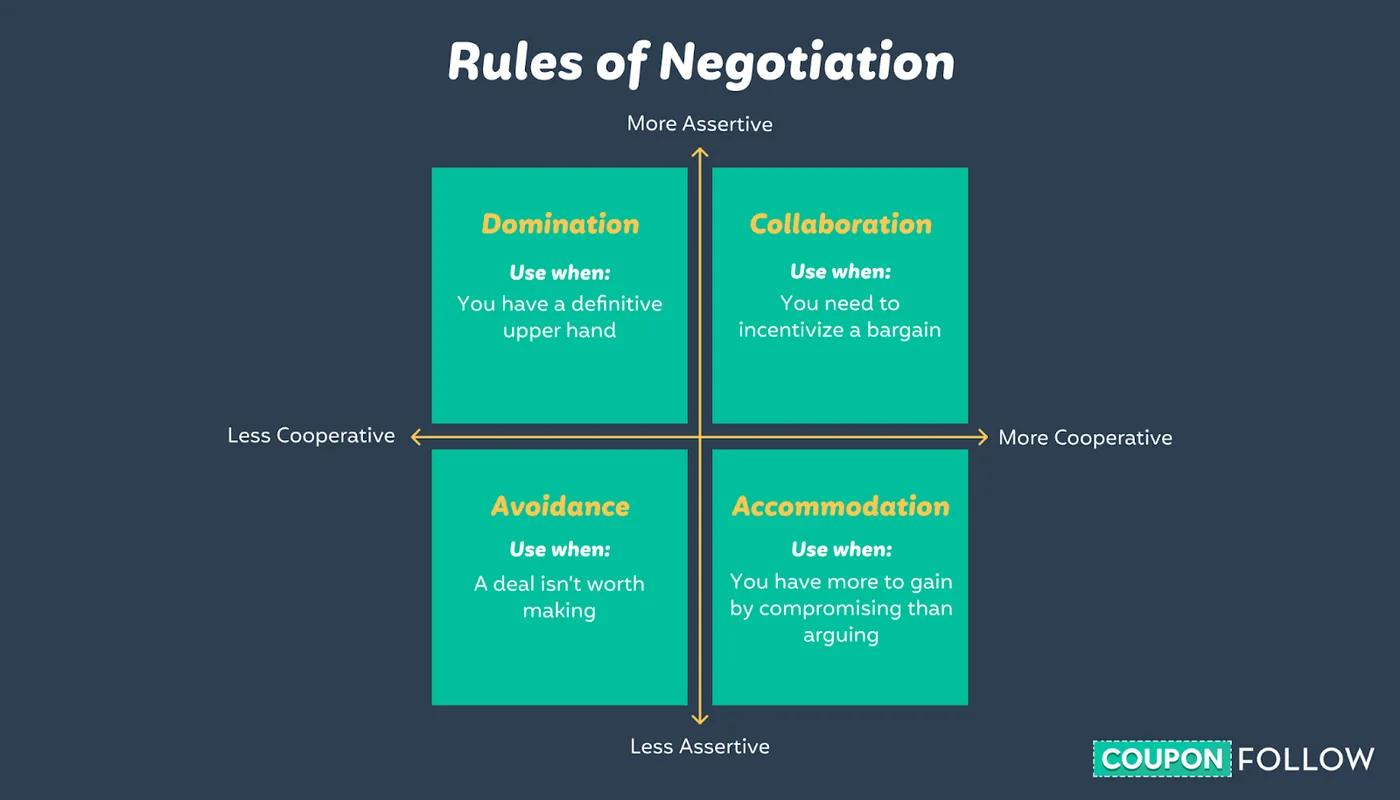
You shouldn’t be shy about bargaining with eBay sellers. The fact is, the same bargaining rules apply when buying items on eBay as in any other physical market.
Start by suggesting a lower price than the asking amount, or, before putting in an offer, simply ask the seller if they’d be willing to accept a lower price.
If you’re polite and offer a realistic price, chances are, you’ll walk away paying a lot less than if you hadn’t bargained.
3. Sign up for alerts on items you want to buy
If you can’t find the specific item you’re looking for, or think the price of the item you’ve located isn’t fair, there’s no need to continually search eBay every day.
Instead, you can arrange an alert email that’ll notify you when the item becomes offered.
All you need to do is:
- Search for the item you want
- Click on the “Save the/this search” link
By default, you’ll be alerted via email whenever a new item that matches your search is uploaded.
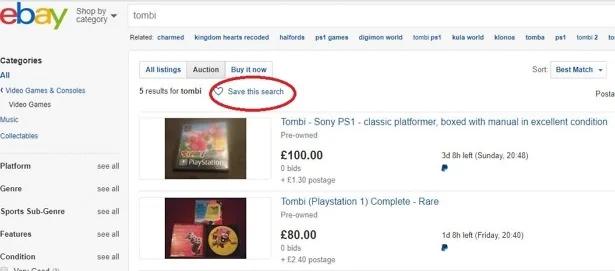
(Image Source)
4. Bid your maximum amount
If you don’t have time to watch the progress of an online auction consistently to raise your bid, you could try bidding your maximum amount right from the start.
Know what to offer by researching the cost of the item and asking yourself what is the most you’re willing to pay.
This won’t only save you time, but will also increase the likelihood of getting that item since other people would have to top your bid to take the lead.
5. “Buy it now” and counteroffer
eBay’s “Buy it now” button gives you the choice to purchase an item at a fixed price (i.e., without having to bid on it). Regardless, you can still disagree with the given price and suggest your own price.
Plenty of sellers will be willing to adjust their prices to suit the shopper’s needs, as long as it’s not below their reserve price — especially if they know that the purchaser is ready to buy the item right then and there.
6. Check eBay local
Depending on the nature of your item (like its weight and value), you might want to consider the impact of the item’s location on the shipping charges.
For instance, let’s say you want to purchase a new couch for your living room, but the item location is far from you. Since the item is really heavy, you’ll pay more for shipping. But, if you choose a seller nearby, your shipping costs will be less — which will decrease your total amount spent.
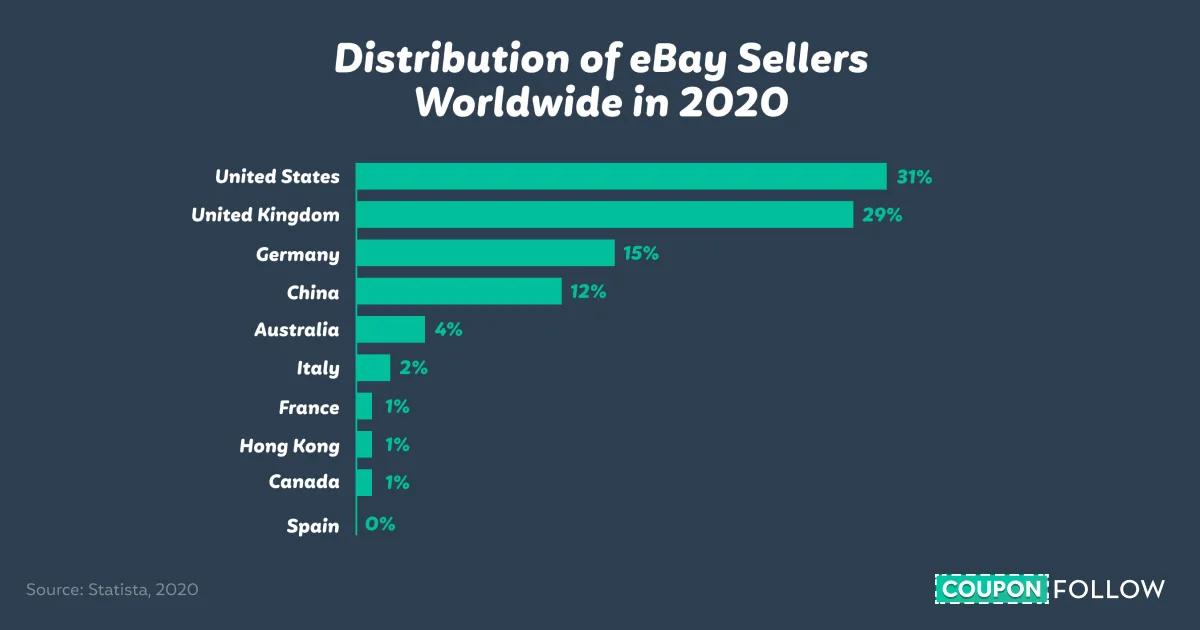
Luckily, if you’re located in the U.S., chances are good that you’ll find a local seller. Actually, in 2020, 31% of eBay sellers were located in the U.S.
7. Consider the shipping fee
When buying on eBay, don’t forget to check the shipping cost as well.
Almost 50% of U.S. consumers say that they expect shipping at no charge when buying something in the $30–$50 range.
Luckily, many sellers include shipping at no charge as part of their offer. An item with a higher price and lower shipping cost may cost you less than a less costly item with a shipping charge. However, remember that delivery time might be longer when you get shipping at no charge.
8. Use coupons
Among the best ways to keep more cash on orders is to use coupons.
When searching for a specific item, always look for discount codes before making the purchase. On eBay, coupons are especially popular for items in the Tech, Fashion, Jewelry, Watches, Handbags, Home and Garden, Refurbished, and Sports categories.
Find amazing, high-discount eBay coupons here.
9. Use eBay’s mobile app
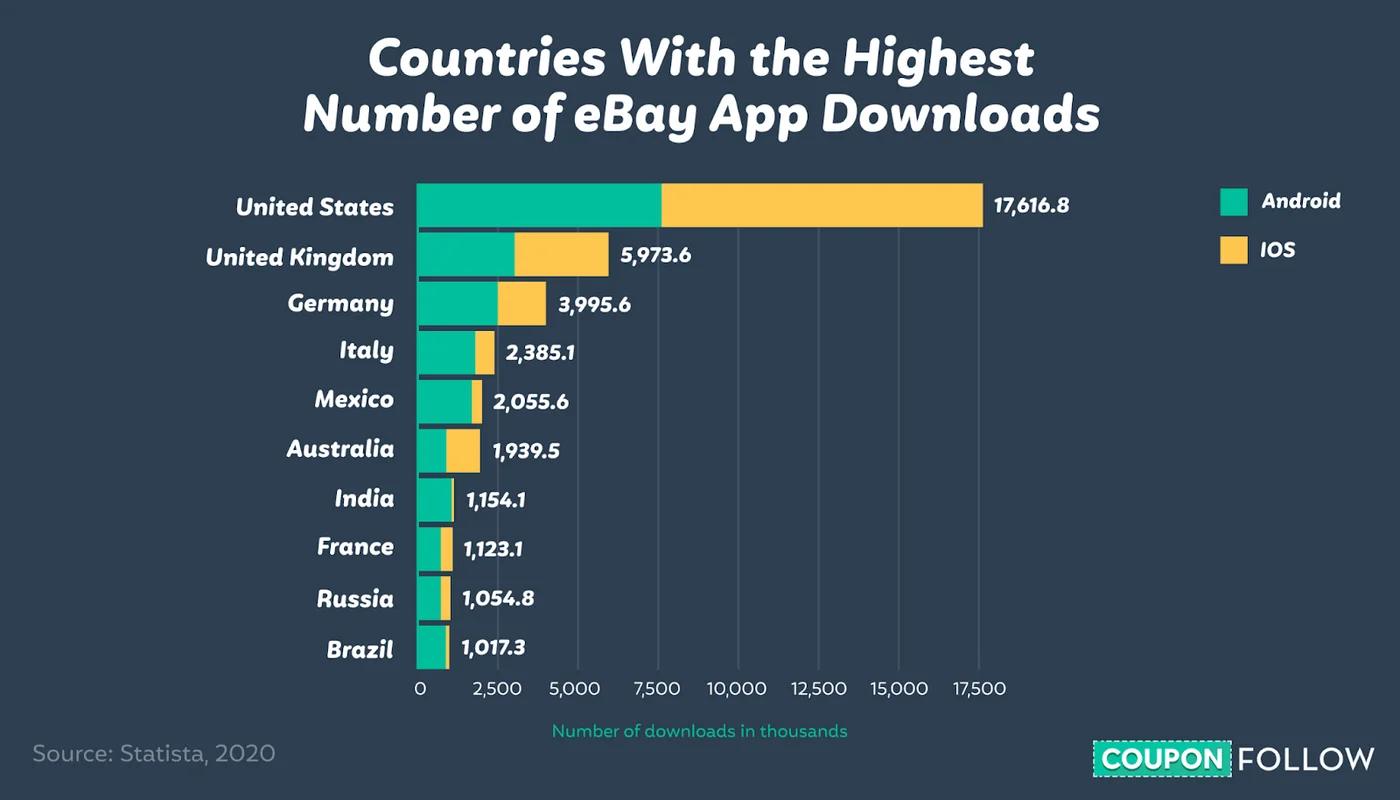
An easy way to stay on top of the most recent eBay listings is to use eBay’s mobile app. The app is offered on both Android and iOS and has already received millions of downloads in countries all over the world. In the U.S., 17.6 million users have downloaded the app.
Through the app, you’re able to:
- Search for items
- Keep track of watched items
- Make orders via the “Buy it now” choice
- Place bids on auction items
10. Learn what others offered previously
If you’re unsure about how much to bid on an item (which is the case for many secondhand items), you can easily learn what other people paid for similar items in past auctions.
To do this, simply change the advanced search settings to “sold listings” and sort by type.
This will show you a list of past auctions and what amount the items were sold for along with each item’s reserve price, if it had one. This will help you determine what your maximum bid should be.
Buy items on eBay
By following the tips above, you can rest assured that you’ll be getting the best deals on your desired items every single time.
Want to learn more about eBay? Here’s a list of over 40 eBay statistics, including user stats, app vs. site stats, international selling stats, and more.
![How Much Can You Save Buying in Bulk? [Study] — before you pay](/assets/media/savings-when-buying-bulk-5b5d466e.jpg)